Fix common setup problems
Start with the symptom, change one relevant setting, and repeat the same question or action.
The chatbot is not replying
Send a customer-side message and check whether it reaches Conversations.
If it is missing, check the channel’s connection or Website installation.
If it arrives, open that inbox’s Chatbot Configuration and check Enable Chatbot.
Check the conversation’s Take over state and whether a person is handling it.
Check the configured message delay, model and account usage.
Save any settings change with Update, then try again.
For WhatsApp, review the channel’s connection status and use the reconnect flow offered by its settings. Use an authorized business account to complete any sign-in requested.
The AI is not using my FAQ
Find the document in Knowledges and check processing has completed.
Check Select a Knowledge Collection in the same inbox customers are messaging.
If using a prepared Sheet collection, check Select a Google Sheet Knowledge Collection.
Save with Update.
Ask a question with a specific answer from the source.
Remove ambiguity or outdated information from the source and retry.
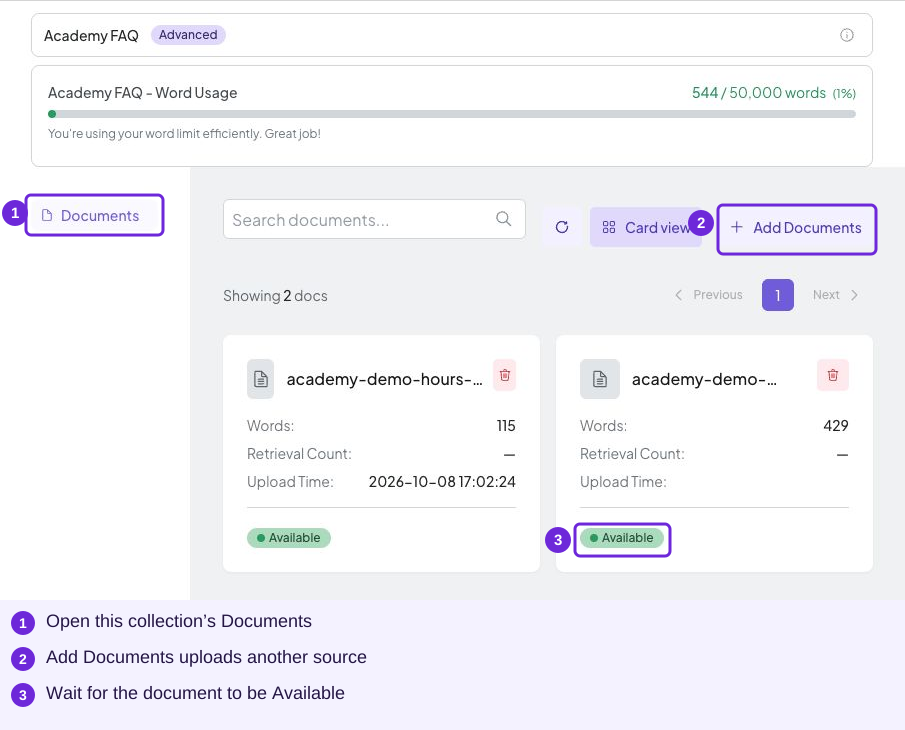
Check document status and the inbox’s selected knowledge when an answer is missing.
Human-request emails are missing
Check Notify Human Agent Condition, the addresses under Notify Human Agent Email, the receiving mailbox and spam folder. A mailbox needs someone responsible for responding. Open the conversation to assign it and handle the customer.
No services or appointment times appear
Check the selected branch, service, staff relationships, active states, Staff Calendar assignment, date and timezone. Wait for the page to finish loading. Review existing bookings and capacity if the schedule is present but a time is unavailable. Booking checks.
A booking is missing from the list
Select another relevant status view, clear Branch and Service filters, and check paging. Compare the customer and booking date before creating another appointment.
A reply gives an outdated price
Confirm the current price and check for conflicting documents. Align your FAQ, service catalog and canned responses. Repeat the original customer question after processing the correction.
Follow-up reminders are missing
Open the correct inbox’s Follow up tab. Check Enable Chatbot Follow-up Messages and save any pending changes with Save Follow-up Settings.
Check Time Interval (minutes) and whether the interval has elapsed after the unanswered chatbot message.
Review Restricted Hours. These are periods when reminders should not be sent.
Check whether the conversation is resolved, the bot is off for it, an agent has replied, or the account is out of credits. The portal lists these as skip conditions.
Check the selected follow-up type. A workflow needs a deployed workflow selection; AI-written reminders need an instruction describing what to say.
Compare Follow-up Statistics with the actual test channel. The statistics count triggers even when a workflow sends no message.
Use the Follow up lesson to choose wording, timing and a test scenario.
When to ask for help
Keep the time, channel, question and relevant screenshot. Share those details with your account administrator or support contact. Keep passwords and access tokens out of screenshots.