Choose the knowledge used by an inbox
Make the chatbot answer from the right business information.
Before you start: Finish processing a knowledge base, such as Salon FAQ.
Assign your collection
Open Settings → Inboxes → your inbox → Chatbot Configuration.
For the basic built-in workflow, check that Chatbot Platform is DahReply.
Find Select a Knowledge Collection and choose your FAQ. The screenshots show an existing collection named Academy FAQ; choose Salon FAQ if you created that sample collection.
Select Update to save.
Send “How long is the Hair Consultation and how much does it cost?” through your connected channel.
Compare the answer with your FAQ: the salon sample says 30 minutes and RM0.
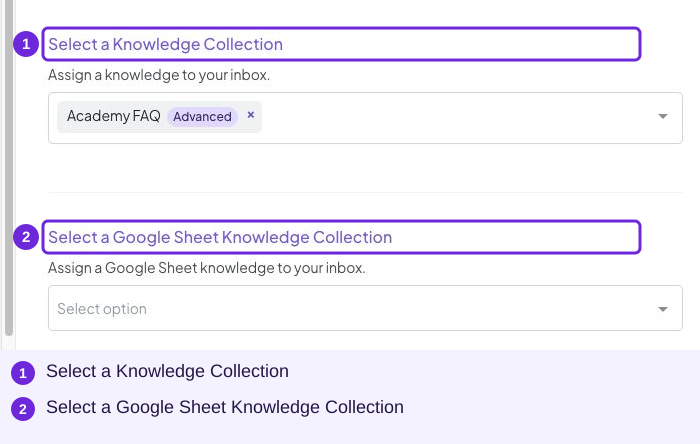
The name is an unsaved salon example. Academy FAQ is the demo’s existing collection; select the collection containing your own business information.
If you use a Google Sheet source
Use Select a Google Sheet Knowledge Collection for a collection already prepared through Google Sheet. This is a separate selector from the file-based knowledge collection.
Understand the Advanced label
Advanced on a knowledge collection identifies its knowledge type. Advanced Mode is a different inbox setting that opens AI Studio. An Advanced knowledge collection does not require you to learn AI Studio.
If an answer is missing or outdated, use the troubleshooting checklist.
Try it
Select Salon FAQ under Select a Knowledge Collection in that Website inbox and save with Update.
You are ready when
- The intended collection is saved in my inbox.
- A source-specific question gets the correct answer.