Save and reuse frequent answers
Answer common questions faster while keeping replies personal and accurate.
Before you start: Have a short answer that matches your current FAQ.
Create a canned response
Open Settings → Canned Responses → Add canned response.
Enter salon_intro in Short code.
Put the sample answer below in Message.
Select Submit and find it in the list.
Our Hair Consultation lasts 30 minutes and is free (RM0). Please tell us your preferred date, time and branch. We will confirm a booking only after an available appointment is saved.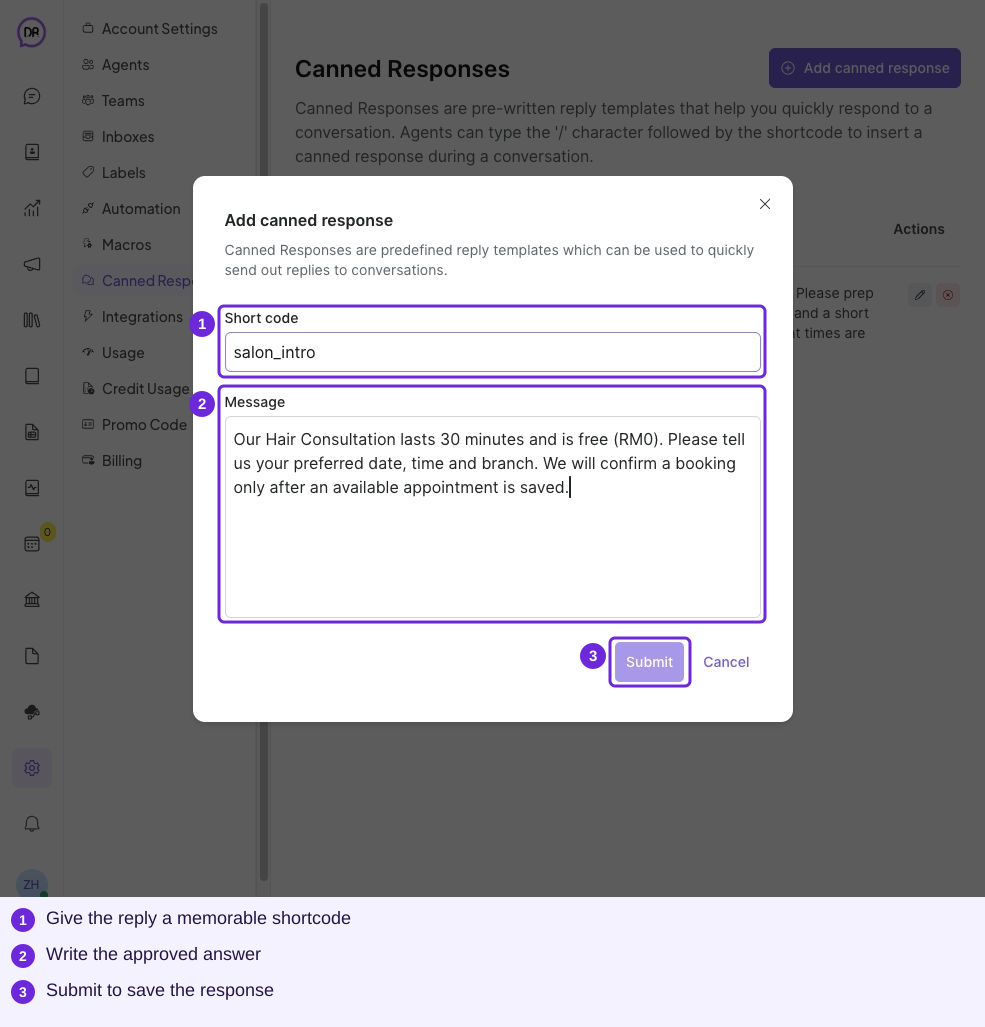
Enter a shortcode and message, then Submit.
Use it in a conversation
Open the customer conversation and choose Reply.
In a clean composer, type /salon_intro.
Select the matching suggestion.
Edit the inserted text to answer the customer’s actual question.
Select Send.
If the customer asks only about price, shorten the reply to the price and duration. Review saved responses whenever services or policies change.
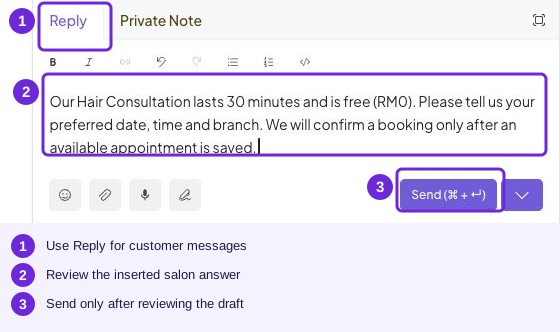
The inserted answer is a draft. Personalise and review it before sending.
Try it
Reply that it costs RM0, optionally adding the 30-minute duration; remove unrelated preparation details.
You are ready when
- My saved response matches the current FAQ.
- I can insert, adapt and send it.