Take over and handle a conversation
Respond personally when a customer needs a human, and keep useful context for your team.
Before you start: Open a conversation in a channel you can reply to.
Take responsibility for the reply
Read the recent customer messages and check Assigned Agent.
Select Assign to me if you will own the conversation.
Locate the separate Take over control in the conversation header. Use it for human handling; assigning a conversation and taking over are separate actions.
Keep ownership and the takeover state clear while you handle the customer. Before relying on the handover with live customers, use a test chat to check that another customer message does not produce a competing AI reply.
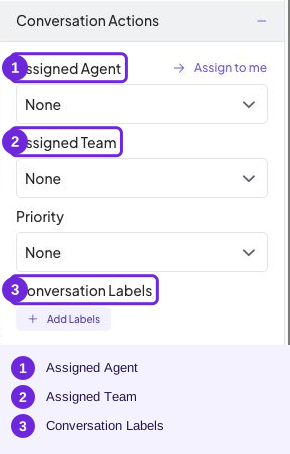
Assign to me and Assigned Agent control ownership.
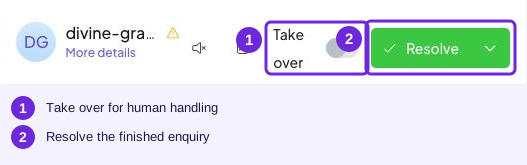
Take over and Resolve are separate from assignment.
Reply to the customer
Choose Reply.
Write your answer, or insert a canned response.
Check the wording and recipient, then select Send.
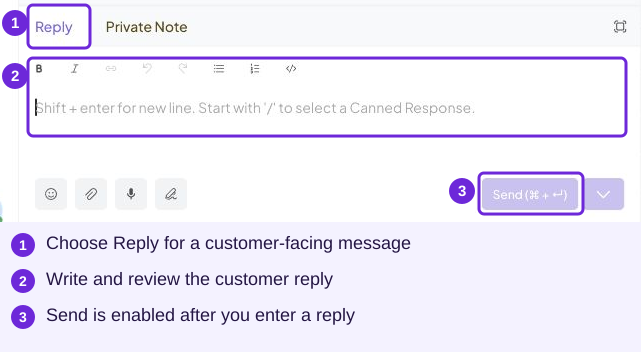
Reply sends to the customer. The empty composer shown keeps Send disabled until a message is entered.
Leave an internal note
Choose Private Note instead of Reply.
Add useful context, such as “Customer wants a stylist to discuss colouring options.”
Select Add Note. Private notes are for your team; customer replies belong in Reply.
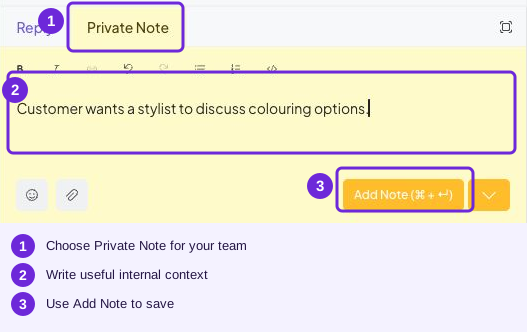
This is a draft note before saving. Private Note is for your team.
Finish or continue the conversation
Use Resolve when the enquiry is complete. Use Reopen when it needs more work. Before returning handling to the AI, review the separate takeover setting and test the next customer message. Resolve, assignment and takeover each serve a different purpose.
Try it
Private Note, then Add Note. Use Reply for customer-facing messages.
You are ready when
- The human owner and takeover state are clear.
- I can send a reply and save a private note.
- I can resolve and reopen a conversation.